
futurize: Parallelize Common Functions via a "Magic" Touch 🪄

I am incredibly excited to announce the release of the futurize package. This launch marks a major milestone in the decade-long journey of the Futureverse project.
Since the inception of the future ecosystem, I (and others) have envisioned a tool that would make concurrent execution as simple as possible with minimal change to your existing code – no refactoring, no new function names to memorize – it should just work and work the same everywhere. I’m proud to say that with futurize this is now possible - take your map-reduce call of choice and pipe it into futurize(), e.g.
y <- lapply(x, fcn) |> futurize()
That’s it – a “magic” touch by one function! Easy!
(*) Yeah, there’s no magic going on here – it’s just the beauty of R in action.
Unifying the ecosystem
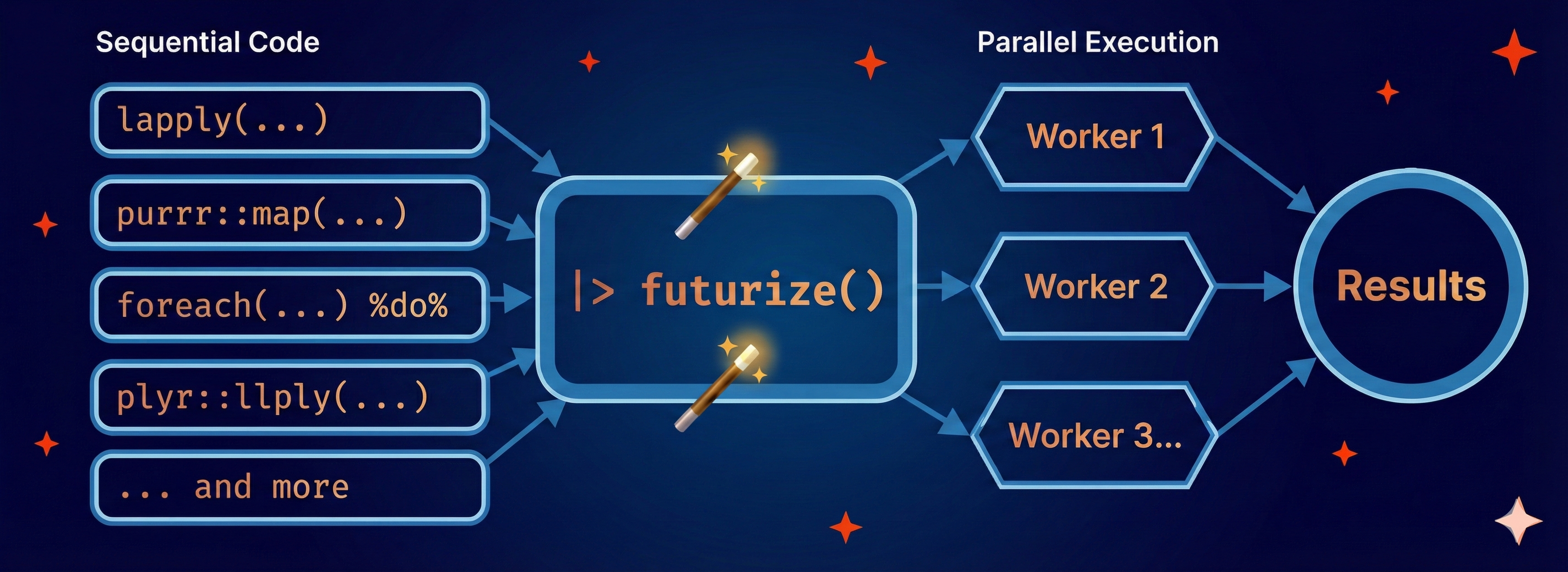
One of the biggest hurdles in concurrent R programming has been the fragmentation of APIs and behavior. Packages such future.apply, furrr, and doFuture have partly addressed this. While they have simplified it for developers and users, they all require us to use slightly different function names and different parallelization arguments for controlling standard output, messages, warnings, and random number generation (RNG). futurize() changes this by providing one unified interface for all of them. It currently supports:
- base:
lapply(),sapply(),apply(),replicate(), etc. - purrr:
map(),map2(),pmap(), and variants - foreach:
foreach() %do% { } - Others: plyr, crossmap, and BiocParallel
Here is how it looks in practice. Notice how the map-reduce logic (e.g. lapply()) is identical regardless of the style you prefer:
# Base R
ys <- lapply(xs, fcn) |> futurize()

# purrr
ys <- map(xs, fcn) |> futurize()
ys <- xs |> map(fcn) |> futurize()

# foreach
ys <- foreach(x = xs) %do% { fcn(x) } |> futurize()
The “magic” of one function
The futurize() function works as a transpiler. The term “transpilation” describes the process of transforming source code from one form into another, a.k.a. source-to-source translation. It captures the original expression without evaluating it, then converts it into the concurrent equivalent, and finally executes the transpiled expression. It basically changes lapply() to future.apply::future_lapply() and map() to furrr::future_map() on the fly and it handles options on how to parallelize in a unifying way, and sometimes automatically. This allows you to write parallel code without blurring the underlying logic of your code.
Domain-specific skills
The futurize package includes support also for a growing set of domain-specific packages, including boot, caret, glmnet, lme4, mgcv, and tm. These packages offer their own built-in, often complex, parallelization arguments. futurize abstracts all of that away. For example, instead of having to specify arguments such as parallel = "snow", ncpus = 4, cl = cl, with cl <- parallel::makeCluster(4) when using boot(), you can just do:
# Bootstrap with 'boot'
b <- boot(data, statistic, R = 999) |> futurize()

# Cross-validation with 'caret'
m <- train(Species ~ ., data = iris, method = "rf") |> futurize()
Why I think you should use it
The futurize package follows the core design philosophy of the Futureverse: separate “what” to execute concurrently from “how” to parallelize.
- Familiar code: You write standard R code. If you remove
|> futurize(), it runs the same. - Familiar behavior: Standard output, messages, warnings, and errors propagate as expected and as-is.
- Unified interface: Future options work the same for
lapply(),map(), andforeach()and so on, e.g.futurize(stdout = FALSE). - Backend independence: Because it’s built on the future ecosystem, your code can parallelize on any of the supported future backends. It scales up on your notebook, a remote server, or a massive high-performance compute (HPC) cluster with a single change of settings, e.g.
plan(future.mirai::mirai_multisession),plan(future.batchtools::batchtools_slurm), and evenplan(future.p2p::cluster, cluster = "alice/friends").
Another way to put it, with futurize, you can forget about future.apply, furrr, and doFuture – those packages are now working behind the scenes for you, but you don’t really need to think about them.
Installation
You can install the package from CRAN:
install.packages("futurize")
Outro
I hope that futurize makes your R coding life easier by removing technical details on parallel execution, allowing you to stay focused on the logic you want to achieve. I love to hear how you’ll be using futurize in your R code. For questions, feedback, and feature requests, please reach out on the Futureverse Discussions forum.
May the future be with you!
Henrik
